

BMA 360D command strings deep dive
For a general overview of the mic array, please see the overview tech note, which includes command string examples to get you started.
Getting connected
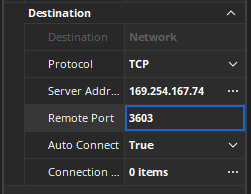
Establish a TCP session to the microphone. This can be accomplished using the Tesira command string block or any terminal program of your choice, such as Putty (shown in the example below).
| Connection settings | Putty | Tesira command string block DSP properties |
|---|---|---|
|
 |
 |
Adding line feed and or carriage return
In some instances you may need to add a line feed and/or carriage return to the end of your command. If needed add ~0d~0a to any sent command. Missing this step may result in command strings reporting a "timeout"
List of commands
PDF Guide: A PDF reference guide for the BMA 360D configuration commands can be download from the biamp.com Downloads page.
HELP
Shows all text commands in alphabetical order.
Query format: HELP
Response format: [Available command list]
BEAMREPORT
Generates a single all beam report of current activity status.
Query format: BEAMREPORT
Response format: BEAMREPORT [b12][b11][b10][b9][b8][b7][b6][b5][b4][b3][b2][b1]
[bx] = 1 Active beam, 0 = Inactive beam
BREPORT
Initiate or halt continuous reporting of active beams.
Command format: BREPORT [x]
[X] = 0 Report disable, 1 Report averaged active beam, 2 Fast reporting of active beams
Query format: BREPORT
Response format: BEAMREPORT [b12][b11][b10][b9][b8][b7][b6][b5][b4][b3][b2][b1]
[bx] = 1 Active beam, 0 = Inactive beam
BFZONE
Enable/disable specific beams.
Command format: BFZONE [beam] [enable]
[beam] = 1 to 12
[enable] 1 = on, 0 = off
Query format: BFZONE [beam]
Response format: BFZONE [beam] [enable]
DANTEIP
Reports the IP address of the Dante interface.
Query format: DANTEIP
Response format: DANTEIP [IP address}
DANTEMAC
Reports the MAC address of the Dante interface.
Query format: DANTEMAC
Response format: MACADDR [MAC address]
GAIN
Adjust or query gain settings of the SmartMix output, Speaker outputs, or AEC reference input.
Command format: GAIN [channel] [group id] [value]
[channel] = 1 to 4
[group id] V = SmartMix, S = Speaker, R = AEC reference
[value] = -65 to 20
Query format: GAIN [channel] [group id]
Response format: GAIN [channel] [group id] [value]
IPADDR
Reports the IP Address assigned for control interface.
Query format: IPADDR
Response format: IPADDR [IP Address]
LBO
Last Beam On, adjust or query if the Last Beam active will be reported when queried.
Command format: LBO [enable]
[enable] 1 = On, 0 = Off
Query format: LBO
Response format: LBO [enable]
LEDBLINK
Adjust or query LED blinking for a given condition.
Command format: LEDBLINK [state] [blink]
[state] 1 = Muted, 0 = Unmuted
[blink] 1 = On, 0 = Off
Query format: LEDBLINK [state]
Response format: LEDBLINK [state] [blink]
LEDBRIGHT
Adjust or query LED brightness for a given condition.
Command format: LEDBRIGHT [state] [bright]
[state] 1 = Muted 0 = Unmuted
[bright] 0 = Off, 1 = High, 2 = Medium, 3 = Low
Query format: LEDBRIGHT [state]
Response format: LEDBRIGHT [state] [bright]
LEDCOLOR
Adjust or query LED color for a given condition.
Command format: LEDCOLOR [state] [color]
[state] 1 = Muted, 0 = Unmuted
[color] 1 = Red, 2 = Orange, 3 = Yellow, 4 = Green, 5 = Blue, 6 = Indigo, 7 = Violet, 8 = White
Query format: LEDBRIGHT [state]
Response format: LEDCOLOR [state] [color]
LOCATE
Initiate or query the BMA 360D locate LED mode.
Command format: LOCATE [name] [enable]
[name] = The programmed BMA name
[enable] 1 = enable locate mode, 2 = disable locate mode
Query format: LOCATE
Response format: LOCATE [name] [enable]
MACADDR
Query the MAC address for the control IP interface.
Query format: MACADDR
Response format: MACADDR [MAC Address]
MUTE
Adjust or query mute settings of the BMA 360D microphone, individual beam silencing status, individual speaker
channels or AEC reference input.
Command format: MUTE [channel] [group id] [value]
[channel] = 1 to 12
[group] V = SmartMix, S = Speaker, B = Beam (Silenced status), R = AEC Reference
[Value] 1 = Muted/Silenced, 0 = Unmuted
Query format: MUTE [channel] [group id]
Response format: MUTE [channel] [group id] [value]
NAME
Adjust or query the Device Name.
Command format: NAME [string]
[string] = Text up to 40 characters.
Query format: NAME
Response format: NAME [string]
RESET
Causes a soft resets of the BMA 360D and retains all settings.
Command format: RESET
Response format: RESET
SERIAL
Returns the serial number of the BMA 360D .
Query format: SERIAL
Response: [Serial Number]
VER
Return the firmware revision of the BMA 360D .
Query format: VER
Response format: VER [version number]
Further reading
Biamp BMA360D Overview - Our overview for the BMA 360 ceiling tile mic array
Network command string block - A primer on the network command string block
Mute sync tech note - A tech note dealing with mute sync in various applications