

Parlé Voice Lift: Survey, Preliminary Design & Calculation Tools
This article covers the first phase of a successful Parlé Voice Lift (PVL) deployment: surveying the physical space and creating a preliminary system design. This phase is critical for determining if a room is a suitable candidate for PVL and for generating the necessary data for installation and commissioning.
Applicable hardware, software, and requirements
Hardware and software
This article applies to the following Biamp hardware and software:
- Microphones: Parlé TCM-X, Parlé TCM-XA, Parlé TTM-X
- PoE Amps: AMP-450P, AMP-450BP
- Processors: TesiraFORTE X (and Voltera D and DM products in special cases)
- Software: Tesira Software 5.4 or newer, Presentation Space Designer, Classroom Designer
Requirements for this PVL step
- A calibrated SPL meter capable of A-weighted measurements.
- A tool for measuring RT60 (reverberation time).
- A reliable laser tape measure.
- The Biamp Presentation Space Designer web tool.
- The Biamp Classroom Designer web tool.
- The Parlé Voice Lift Calculator spreadsheet.
- A thorough understanding of the Parlé Voice Lift: System Overview article.
Section 1: Conducting the Room Survey
Before any design work begins, validate that the room meets the "Pillars of a Successful PVL system".
Measure Room Acoustics
- With the room in its normal use state (HVAC on, projectors on, etc.), use an SPL meter to measure and document the ambient Noise Floor. The ideal reading is 43 dBA or lower.
- Using an appropriate tool, measure and document the room's RT60. The ideal value is 500ms or lower.
- If the Noise Floor and/or RT measurements fall outside of recommended values, please evaluate whether the room is a good candidate for PPL.
|
Room Acoustics |
Noise Floor |
Reverb Time (RT60) |
Max. Mic-to-Talker Distance | |
| TCM-X | TTM-X | |||
| Good | 35-43 dBA | 400-500 ms | 3 meters (10 ft.) | 1.7 meters (5.6 ft.) |
| Great | 30-35 dBA | 300-400 ms | 3.8 meters (12.5 ft.) | 2.1 meters (6.9 ft.) |
| Perfect | less than 30 dBA | less than 300 ms | 5 meters (16.3 ft.) | 2.5 meters (8.2 ft.) |
Measure Room Dimensions
Measure and document the extent of the room including its length, width, and ceiling height.
- Ceiling type and Reflected Ceiling Plan (RCP) should be gathered as well.
Identify the primary presentation area (stage, lectern area, etc.) and audience area; document their dimensions.
- Measure and document the distance from the center of this area to the seating position of the furthest audience listener. This distance ideally should be greater than 35-40 feet (10.7-12.2 meters).
Evaluate Loudspeaker Plan
Obtain an accurate Reflected Ceiling Plan (RCP) of the room. This is often available from the owner.
Review and confirm ceiling availability for Parlé microphones and appropriately zoned loudspeakers.
- Each loudspeaker zone must be wired to a dedicated amplifier channel for proper gain mapping.
- Ensure that coverage is focused tightly on the audience seating areas while keeping a 6 ft. offset from the nearest microphones.
- If the ceiling is open architecture, the microphones and loudspeakers need to share the same mounting plane.
Section 2: Using the Available Design Tools
Parlé Voice Lift (PVL) is a recent feature development in the Tesira product; it will likely require complimentary tools to help formulate a complete design. Many of the design details will be informed by the user and system needs.
PVL is a larger umbrella concept under which two distinct applications exist:
- Presenter Lift: One stage area to audience area listeners. (AKA one-to-many)
- Participant Lift: Any talker to any listener. (AKA many-to-many)
Access the Design Tools
- Use the Presentation Space Designer if the project involves one-to-many needs.
- This tool advises fixed beam aiming for presentation stage areas.
- Use the Biamp Classroom Designer if the project involves many-to-many needs.
- To provide proper microphone coverage for audience areas even if they do not need voice lift.
Define the Room Parameters
Follow the guidance in the Presentation Space Designer or Classroom Designer tools and complete all details to document the room.
- Enter the project room dimensions, ceiling height, and acoustic data (Noise Floor and RT60) gathered during the room survey.
- The design tool measures all device coordinates from the top-left corner of the canvas. To avoid confusion, orient your room diagram to Portrait Mode so that the "front-left" corner of the room corresponds to the "top-left" origin point in the tool.
Place Equipment and Define Areas
Place the presenter area and audience area, Parlé microphones, and audience loudspeakers on the design canvas, matching their intended physical locations based on available ceiling locations. Please mark out ceiling tiles or locations that are not available for microphones or loudspeakers.
Verify Microphone Coverage
If the audience area requires microphone coverage for UC or Participant Lift, the Classroom Designer tool will accommodate this portion of the design requirement.
- Use the rendering tools to verify microphone fixed beam coverage of the presentation area.
- Some designs may require Parlé microphones dedicated to covering the presentation area with additional Parlé microphones for coverage of front audience seats. Discuss system needs with the end-user during the design phase to minimize requests late in the project. Seemingly small requests such as Parlé LED ring behavior for stage vs. student areas are worth discussing.
Generate Commissioning Report
Once the design is complete, save and export the respective design reports to PDF. These reports contain all documented room dimensions and details, providing critical pieces of information for commissioning:
Share and Archive the Design
Save the links and export the PDF reports from Presentation Space & Classroom Designers to share with the project team. Save a copy of the PDF to archive.
Parlé Voice Lift Calculator
- Use the interactive spreadsheet to collate microphone and loudspeaker positional information from the Presentation and Classroom Designer tools. This will be most helpful once the equipment is installed;
- When field installation occurs, measurements can be updated using this interactive sheet.
- Final calculations of gain mapping and AEC cross-referencing needed for the Tesira file.
Section 3: Creating the Initial Tesira File
With the design validated, create the foundational Tesira file. Biamp Tesira 5.6 provides dynamic creation of the PVL block assembly via the Processing Library. This is a new workflow for the user that will expedite core signal flow creation.
From the Processing Library pane, select the Parlé Mics catalog followed by the item or type of application:

Enter the parameter values required by the design:


Note: Each system design is unique, and this base file requires customization to match the room design needs.
Open Gain Mapping Matrix mixer and import .csv information from Parlé Voice Lift Calculator spreadsheet.

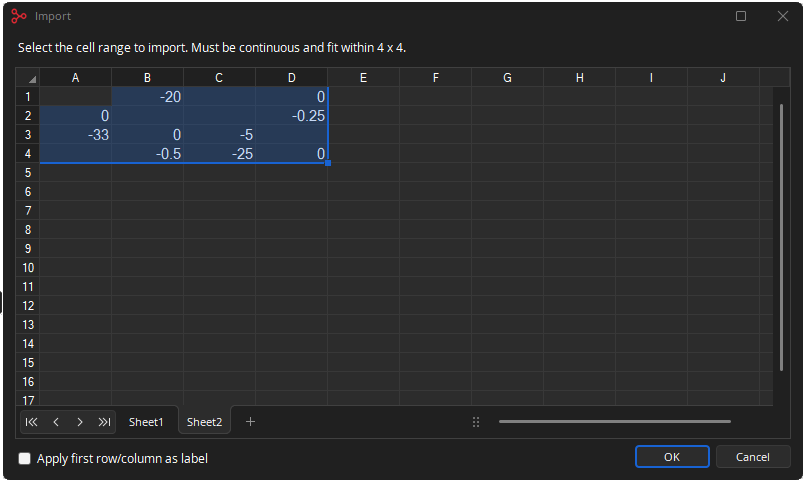
Edit and add the project-specific hardware blocks to the Equipment list as needed (e.g., Forte X, TCM-X, TCM-XA, AMP-450P, TTM-X, etc.).
Compile the Tesira file and review the Equipment Table to confirm the proper Tesira equipment is planned and ordered for the project.
Save and share this file with the project team.
Section 4: Additional Survey Resources
The following applications and resources may be helpful to the survey process:
iOS:
- SPL meter only.
- RTA - RTA only.
- RT60
- SoundTools - RTA, Noise Floor, FFT etc.
- NIOSH Sound Level Meter.
- Decibel X: Sound Level Meter.
- SoundPrint
Android:
- Sound Spectrum Analyzer - RTA & SPL meter.
- Sound meter - SPL & dB meter.
- Spectroid - FFT.
- Sound Spectrum Pro - RTA, FFT etc. bundle.
- SoundPrint
PC & Mac:
Professional Grade:
Related Room Acoustical Standards:
- NTi - (NC) Noise Curves and Criteria for evaluating a room (p. 14)
- ANSI/ASA S12.2-2019
- DIN 18041:2016
- IEC 60268-1
Further Reading
- Parlé Voice Lift: Overview (Start Here)
- Parlé Voice Lift: Installation and Pre-Commissioning
- Parlé Voice Lift: System Commissioning
- Parlé Voice Lift: FAQ's
- Parlé Voice Lift: Landing Page