

Parlé Voice Lift: System Commissioning
This article covers the final phase of a Parlé Voice Lift (PVL) deployment: configuring the processing blocks and tuning the system for optimal gain-before-feedback. This hands-on process requires careful, methodical adjustments. Every step in this tuning process is essential in achieving the goal of 6-12 dBA system gain.
Hardware and requirements
Applicable hardware
This article applies to the following Biamp hardware and software:
- Microphones: Parlé TCM-X, Parlé TCM-XA, Parlé TTM-X
- PoE Amps: AMP-450P, AMP-450BP
- Processors: TesiraFORTE X (and Voltera D and DM products in special cases)
- Software: Tesira Software 5.4 or newer, Presentation Space Designer
Requirements for this PVL step
- The relevant updated design resources for the room as initiated during the design phase and updated during the pre-commissioning phase :
- Presentation Space Designer
- Classroom Designer
- Parlé Voice Lift Calculator
- The current project-specific Tesira file - likely active on the current system.
- A person or talkbox available to speak from the presentation and audience areas during tuning.
- Measurement Instrumentation:
- A calibrated SPL meter capable of A-weighted measurements.
- A tool for measuring RT60 (reverberation time).
- A reliable laser tape measure.
- FFT Analyzer and/or RTA.
- A thorough understanding of the Parlé Voice Lift: System Overview article.
Section 1: Validating Prior Work
Reviewing all prior design and installation work, as well as the pre-commissioning efforts, helps familiarize the commissioning team with the room and system. Ideally, members from the pre-commissioning effort are available to assist in the System Commissioning phase as well. The process definitely moves faster when two or more people are involved.
Review design tool reports
Audience seating and furniture layout determine PVL Beam aiming. For spaces with multiple room modes, presets enable discrete beam aiming profiles to accommodate layout changes.
- Spot check the location of microphones and loudspeakers as needed.
- Device location information builds the PVL Beam aiming and Gain Mapping values.
- Confirm stage or presentation area attributes as needed.
- Some details and expectations may have changed from the Survey phase of the project.
- The stage area also dictates PPL Beam aiming.
- Confirm audience or participant area attributes as needed.
- Some details and expectations may have changed from the Survey phase of the project.
- Furniture placement and orientation may guide or change design decisions.
- Review the Gain Mapping and AEC Referencing calculated by the Parlé Voice Lift Calculator sheet.
- Make any updates or corrections as needed.
Connect to the Tesira system
- Verify the expected Tesira equipment is installed and visible on the network.
- Step through all three sections of the Installation and Pre-Commissioning phase guidance to review that all is as expected.
- Make any necessary updates or corrections.
Section 2: Initial Block Configuration
After all of the validation work in the previous section, the key Parlé blocks can be configured according to the needs of the system. If a Presentation area has been defined, then the Presentation Space Designer provided beam aiming for these blocks. If audience microphones are to be lifted, these beams need to be locked and aimed as well. The audience furniture placement and orientation dictates the beam aiming details. If the seating is flexible, the beams should be aimed in an 'X' or '+' pattern with an elevation of 45-60°.
Lock and Configure Parlé Beams
- In your Tesira file, open the Parlé Mic block control dialog.
- Check the box for Lock Beams.
- For each of the four beams, enter the Azimuth and Elevation values from the Presentation Space Designer report. This will statically aim the beams to cover the stage area.
- Double-check the origin information noted on the report; it is noted as the top-left corner of the room diagram.
- Set the LED behavior to Beam Display to display the beam aiming at the TCM-X:


Configure the Frequency Shift block
Open the Frequency Shift block control dialog and set it accordingly.
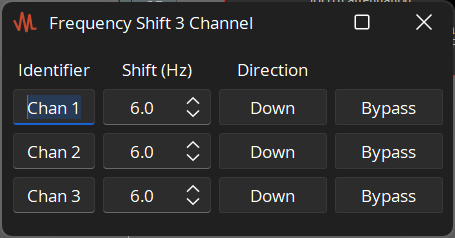
The default setting is 6Hz in the Downward direction. This default is considered an effective starting point.
In acoustically favorable rooms, this may be lowered to be even more transparent. More challenging rooms may benefit from raising this to 12 Hz.
- Some listening ears may be more sensitive to larger frequency shifts.
- The Direction can be changed to Up if desired, but Down takes advantage of shifting any looped (would-be feedback) audio signal downward toward the HPF.
Enter Gain Mapping Values
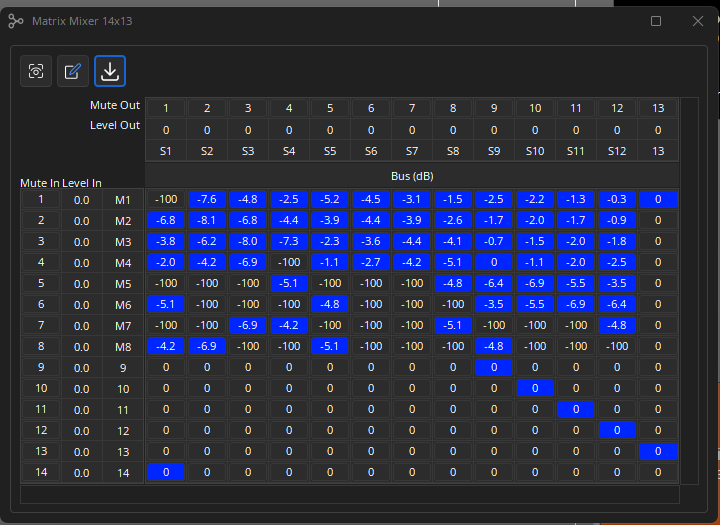
Verify the values have been imported into the respective matrix mixer blocks from the Parlé Voice Lift Calculator spreadsheet (initially detailed in the PVL Preliminary Design article); if this step hasn't been completed, proceed with the import:
Find the Gain Mapping Matrix Mixer and AEC Ref Mapping Matrix Mixer.
Note: Adjust the channel count to match the project's needs.


Double-click the Matrix Mixer block and use the import button to import values and labels.


Preliminary Test
Establish a Reference Point - Set the PPL Master level to -12 and mute the block.

Bypass the Frequency Shift block - In the Frequency Shift block dialog, check the Bypass button. This will allow us to find the system's natural feedback point without any processing assistance.

Introduce a Live Audio Source - Have a person stand in the presentation area and speak in a clear, consistent voice (~63 DBA@1m).
Gradually Raise the System Level - Unmute the PPL Master Gain and slowly increase the level until the system is on the edge of feedback.
- Note this as the system's natural feedback point.
- Re-engage the Frequncy Shift block in preperation for the next steps.
Section 3: System Tuning ("Ringing Out the Room")
This process identifies room-specific frequencies that are prone to feedback for each microphone so they can be notched out. This step may add 1-3 dB of additional system stability. The example file and any PVL/PPL block assembly built by Tesira 5.6 or newer will include text block guidance through this entire process. The following is an overview using excerpts from the dynamically built processing library file:
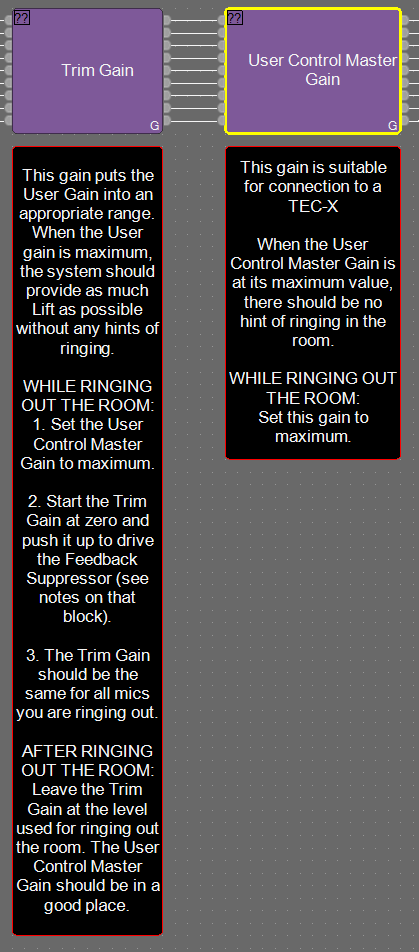

This process must be methodically completed for each microphone that is lifted to loudspeaker zones in the room. Best performance has been found by solo-ing each beam of each mic when ringing out the mic; this builds a more comprehensive EQ curve for each specific microphone. Select this link for a short demonstration video captured for reference.
Section 4: Final Optimization and Verification
Verify Gain Shading - While a person is speaking from one microphone beam, walk the audience area from front to back. The perceived reinforcement should be smooth, consistent, and natural-sounding.
Test System Performance - Have the talker walk throughout the entire designated microphone area. The audio level in the audience should remain consistent.
- Establish Nominal - With the talker talking in the microphone beam or area, adjust the User Master Gain level. The goal is to determine a Nominal level for the system performance as well as an upper and lower usable limit. We expect this range to look something like this:

Max = Nominal +3
Nominal = Nominal
Min = Nominal -6
- Set Limits - Once the usable range limits have been determined, set them in the Master Gain block and save presets as needed. Users of the PVL system will likely benefit from a user-facing control such as TEC-X 1000. This user-facing control should control the PVL Master Gain level within the defined limits. Keep in mind, each system will have different use cases. Offering this control range allows the user to adjust system performance to meet the changing needs. As the AV Systems Integrator, you know the needs of the user and the system best; please accommodate accordingly.
Section 5: Advanced Tuning Techniques (Optional)
For particularly challenging acoustic environments, the following techniques can provide an additional degree of stability and control.
Implement a Soft Noise Gate - The available base PPL file includes an advanced compressor configured as a soft noise gate. There are times when enabling this block will be helpful. The following shows the curve in use when enabled, open the meters, and adjust according to system-specific needs:

- This can help prevent low-level audience noise or rustling sounds on stage from opening the PPL automixer gate, without being as abrupt as a hard gate.
Apply a Slow pull-down AGC - The base PPL file also includes an optional AGC block that has been bypassed. If engaged, this block will take a slow 2s average of the PPL microphone signals and apply slight attenuation over time. This dynamic may help smooth the listener experience of different presenters of different loudness and energy levels.

Optional: Implement time delay for very long rooms and discerning listeners, add delay to the loudspeaker zones to improve localization (the perception that the sound is coming from the presenter, not the ceiling). This is an advanced technique and should be implemented with care to avoid introducing audible artifacts.
Section 6: End-User Demonstration
- Establish a Baseline - To showcase the system's effectiveness, have the client listen from the back of the room. Start with the system muted and speak from the stage.
- Demonstrate System Performance - Unmute the system and continue speaking. The lift in intelligibility should be clear but not distracting or sound like a PA system.
- Provide End-User Guidance - Instruct the end-users to stay within the designated presentation area (where the microphone beams are locked) for the best performance. Explain that the system is designed to be automatic and transparent.
Further Reading
- Parlé Voice Lift: Overview (Start Here)
- Parlé Voice Lift: Site Survey and Preliminary Design
- Parlé Voice Lift: Installation and Pre-Commissioning
- Parlé Voice Lift: FAQ's
- Parlé Voice Lift: Landing Page