

Operating Voltera D and DM devices as Standalone

Voltera D amplifiers are capable of receiving Dante, AVB, or analog audio. In some circumstances, they may need to be configured separately from the other devices in the system. One example of when this is necessary is for systems where the Voltera D will not be connected to the AVB or Dante network because the analog inputs are the primary way the amp will receive audio. Another example is when the amplifier recieves Dante audio from a Tesira system that also includes AVB-capable devices. The Voltera D can be programmed independently of the other Tesira AV devices, even if they transmit audio between them. Using a separate configuration file allows the amplifier to operate off the AVB network without persistent network audio faults.
Why would a device need a separate configuration file?
Each Voltera D amplifier is capable receiving AVB audio, and so its media port (port 1 in converged, port 2 in dedicated port mode) is always looking for AVB devices on the network to synchronize clocks to. If the amplifier is in the same configuration file as other AVB capable devices, but is not connected to the AVB network, it is likely to report AVB clock synchronization issues. If the system is designed to provide the amplifier with analog audio but no network audio, the Voltera D is likely to report network audio faults if it is configured with a file that includes AVB-capable devices, even including ones that are not programmed to use AVB. In order to avoid persistent AVB network errors for an amp that isn't even connected to the AVB network, you should send a Tesira configuration to the Voltera D that does not include any other devices, and send a separate configuration file to the rest of the system. There are also some situations where Voltera D/DM devices nee to operate un a remote location or in a different port mode than other Tesira devices on the network. Configuring you these devices as standalone Dante mode allows for this without AVB capable switches.
Including Analog Input or Dante Input Block
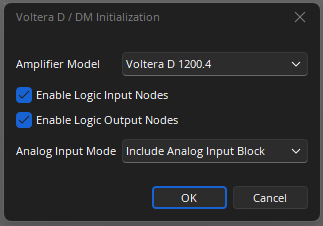
The Voltera D block is capable of receiving Dante, AVB, and/or analog audio, even without an input block connected. Neither the analog input block or Dante input block is required for the configuration to be complete. When you add the Voltera D block to the file, you have the option of changing the analog input mode to include an analog input block. This provides an additional gain stage that you can control, but it does not change the amplifier's input priority. The Voltera D amplifier block is one of the only blocks that can compile properly and can receive AVB, Dante, or analog input without the corresponding block, even if a different block is connected to the amplifier block's inputs. The simplest method is to add the Voltera D block in an empty configuration file and then compile.


The other methods of configuring a Voltera D amplifier as a standalone system are as follows:


Input Priority and Analog Failover
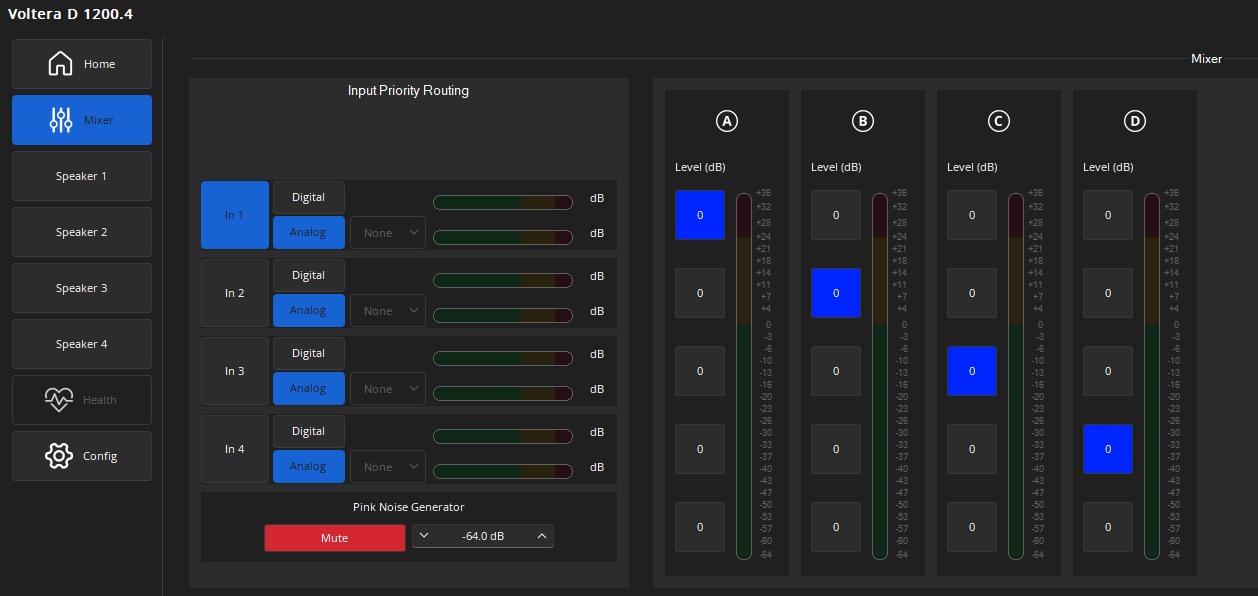
The default settings for Voltera D blocks already uses digital audio as the primary, with analog failover. The following screenshot shows the default setting, The amplifier will only switch over to the analog inputs if no digital audio is received.

Analog primary with digital failover is not supported, so in order to exclusively use the analog inputs, the amplifier needs its own Tesira configuration. If Dante or AVB audio is routed to the amp, it will always prioritize that over its analog inputs. When only using analog inputs, the input priority should be set to analog.
Disabling Analog Failover
It is rarely necessary to disable analog failover, since it will only use the analog inputs when digital audio is lost. If the analog inputs are disconnected, the result would be the same as disabling analog failover. When setting up or troubleshooting analog failover, it can be helpful to know how that option can be disabled. To disable analog failover, go to the mixer page in the Voltera D block and select "none" from the dropdown menu for each channel that should have analog failover disabled. If analog audio is desired as the primary or backup audio input type, please ensure that the number selected in that dropdown menu is the analog input channel that the corresponding output channel should use.

Setting up speaker profiles
It is necessary to add speaker profiles to the Voltera D amplifier block in order for it to send signal to its outputs. If the connected speakers are not receiving signal, but the amplifier is receiving audio from its intended input sources, then it may be due to that channel's speaker profile. To avoid damaging equipment, please verify these values before connecting speakers and testing the amplifier.
