

Camera Fencing and People Count for VBC 2800 and Vidi 280
Biamp Camera Controller firmware version 1.10.0 and higher provides an innovative Camera Fencing feature for the Vidi 280 Conferencing Camera and Parlé VBC 2800 Conferencing Bar. Camera Fencing allows users to configure and limit the area that the camera displays. This can be used in glass-walled conference rooms to prevent the camera from focusing on people walking outside the room. In auditoriums or larger rooms, this option can define a small area to be displayed.
Compatibility extends to VCB 2800 (firmware v1.8.0) and Vidi 280 (firmware v1.3.0), and higher.
This article provides:
- A procedure for how to set up camera fencing
- Information on the People Count feature.
Camera Fencing
1. Press the Fencing Configuration button.
- A window will pop up to enable the feature and define the space.

2. Enable Fencing and adjust the depth of field and width - right and left of the center focal point.
- The maximum supported depth from the camera is 6 meters.
- The width is also a total of 6 meters, 3m to the right and 3m to the left of the camera center.
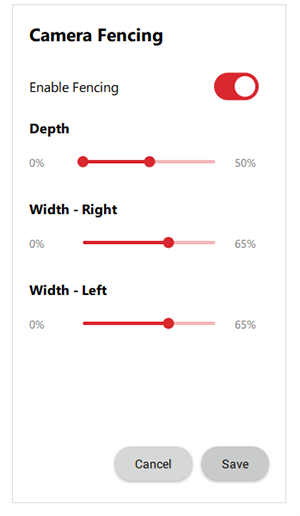
3. An indicator rectangle (green or red) around the face of a person who is looking at the camera indicates if that person is inside or outside the defined space during the configuration. As the person moves around, adjust the dimension percentages with the sliders to define the space.
- Green = inside
- Red = outside
4. Save the configuration.
- The camera will still "see" the information outside of the fenced area, but will only recognize people in the defined "fenced" area. This is especially helpful when autoframing or tiling is enabled.
Example
In this example, the defined fenced space within the larger room is effectively 3 meters deep and 2 meters on either side of the center.

People Count
The Information tab shows the connected device and also a toggle-style button (Show/Hide People Count) to count the number of people the camera can see. This feature is limited to counting figures within 6 meters of the camera's field of view.

NOTE: The camera's smart people counting function will count all the people visible to the camera, even if they are outside of the zoomed area visible on the screen.
Network Control (VBC 2800): The VBC 2800 camera supports the people count feature that is available via this Control command. This feature is limited to counting figures within 6 meters of the camera's field of view.
Get the current people count
- Example Command:
- Camera get peopleCount
- Expected return:
- +OK "value":2