

How to troubleshoot RS-232 with an Impera Tango
 This article explains how to troubleshoot RS232 on a Tango using the Tango.
You may be trying to control a device and it's not working. You need a way to verify the commands are being sent, but don't have a COM port handy.
You can use the Tango itself to troubleshoot with just a few wires.
Example - Create a simple file with an RS232 capable device on port 1 and port 3 in your Config.
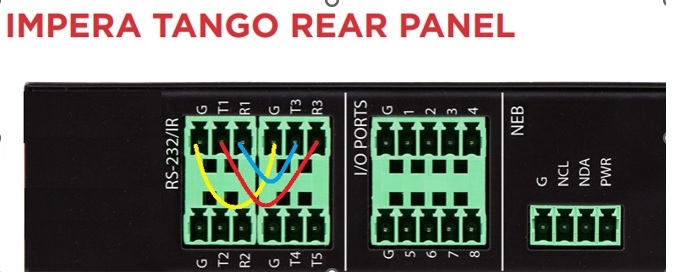
Wire up the RS232 for ports 1 to 3 as follows
- RS-232 port 1 RX to RS-232 3 TX (BLUE)
- RS-232 port 1 TX to RS-232 3 RX (RED)
- RS-232 port 1 and 3 Grd connected. (YELLOW)
In my example, I used a driver for a TesiraForte AVB VT4 with a couple of RS232 commands in it for power.
I dropped one on Com 1, the other on COM 3. I created a couple of buttons in my file, and used the WebUI with the Tango's IP address for my touch panel.
Connect to live monitoring. Open up a webpage with your Tango’s IP address
Press buttons. You should see the TX sent from port 1 received as RX on port 3
