

System Design Template - Multi-World University Campus
This system design template shows how Vocia products can be used to easily create a facility-wide paging system for education environments. Vocia is a highly reliable solution that provides excellent audio quality while managing all your paging, background music, and emergency communication requirements. It is powerful, scalable, and flexible, and will meet a facility’s needs well into the future. A decentralized approach, which places digital signal processing in all endpoints creates a solution with no single point of failure as well as a means to expand an existing system as needs grow.
Overall the education vertical market has an extended demand for system availability and safety measures, especially when it comes to schools and universities with hundreds of students and staff. Vocia is capable of meeting and exceeding these requirements.
System description
The outlined Vocia system is designed to provide campus-wide paging across multiple remotely located buildings. It allows for smart and granular zone assignment to make directed announcements to individual classrooms, labs, theaters and other areas where students or staff may be present.
The total number of buildings in this design is three, therefore a total of three Vocia Worlds are required.
The reason this system is segregated into multiple Worlds (and not just one large World) is due to the limitations of CobraNet, which is the underlying technology for transporting the digital audio across the Vocia network. CobraNet is a Layer 2 technology meaning that it is not routable. In addition to this, distance limitations come into play due to audio latency as well.
To overcome this, MS-1e Message Processors are required in each World. These translate the audio and messaging from the Vocia CobraNet network to a routable TCP/IP connection (Layer 3). These MS-1e's then communicate with each other over the LAN or WAN to exchange audio and information to other Vocia Worlds.
This article shows how to design a Vocia system when distance or routing factors need to be considered for a campus or facility of your own.
Emergency functionality
This example university does not include emergency or evacuation functionality. The aim of this article is to show the requirements for distributing Vocia audio when distance or routing limitations apply - however, Emergency functionality is easily added to a Vocia system.
The benefit of Vocia is it is modular, meaning at any time a system can be upgraded with the features it requires or expanded as a facility expands. For example, the amplifiers already used in this design are emergency capable devices, so to expand the rest of the system to incorporate fire alarm integration and/or voice evacuation, a Life Safety Interface (LSI-16e) and Control Interface (CI-1) are all that's required, optionally an Emergency Paging Station could be added if Live emergency paging is required as well.
For examples of how to add emergency and evacuation functionality to a Vocia system, please refer to other application notes in the Vocia section of the Design Library that indicate this feature.
Please note that local standards may apply to determine the design, commissioning, and operation of voice evacuation and fire alarm systems. System configuration, connection methods, and sound pressure levels must all be considered and confirmed for the local jurisdiction.
Paging functionality
The system allows live paging from the Administration building into the Arts & Business Building (Building 1) as well as the Science & Technology Building (Building 2). These include an all-building wide page, all-faculty wide page and all-classroom wide page. This is possible through a DS-10 paging station in each building which offers up to 999 page codes, which in this example means granularity to each building, faculty or classroom is more than achievable.
Pages can also be made from Building 1 and 2 back to the Administration building, as well as to classrooms in the local building.
This functionality is referred to as Interworld Paging. Interworld Paging is the ability for an anouncement in one World to be sent via the local MS-1e to a distant MS-1e for playback. The paging information contained in the sent data will include Zone routing and preamble allocation as well as the recorded audio from the transmitting MS-1e.
The transmitting MS-1e first receives and records the live page, this is then sent to the receiving MS-1e unit (one or many). Once the page has been fully received by the MS-1e it will then be converted and played.
*Emergency Interworld Paging is not supported
Equipment list
Each Building contains the following Vocia items
- 1x DS-10 Desktop Paging Station
- 1x MS-1e Message Processor
- 1x Amplifier (Administration VA-4030e (4x 30W) / Buildings 1 & 2 VA-8150CV (8x 150W))
- Biamp Desono speakers - speaker count as required
*Other non-Vocia devices, such as switches may be additionally required.
Vocia configuration file
The Vocia configuration file is available for download here:
The configuration already contains the necessary settings to get the system into an operational state. The Vocia software must be installed to open and review the configuration file. In order to provide a better understanding of the most essential settings, the Zones and Page Code assignment can be previewed below.
| Admin Zones | Admin Pages Codes | ||
 |
 |
| Building 1 Zones | Building 1 Page Codes (showing Admin Interworld Page Code assignment) | Page Code assignment on Building 1's Paging Station | Building 1 Amplifier - Zone assignment. 3:1 failover. |
 |
 |
 |
 |
- The administration building uses two channels of the VA-4030 which is a 4 x 30W amplifier, appropriately sized for the lower number of speakers and size of the building.
- Buildings 1 and 2 use a larger amplifier, the VA-8150CV which is an 8 x 150W constant voltage amplifier. They service many classrooms, are required to drive more speakers and are bigger buildings than administration, so require additional power.
- Failover is configured on amplifier channels 4 and 8 of the VA-8150CV amplifiers. This means if a failure of an amplifier output were to occur, the amplifier will switch to this 'spare' channel to resume driving the speaker line. No additional wiring is necessary for this, all switching functions are done internally and automatically in the amplifier.
- The message processor (MS-1e) can be additionally used for hosting recorded messages, scheduling of bells, email reporting of system health as well as VoIP paging functions.
Speaker lines
- Speaker circuits are being installed as constant voltage speaker lines - 70V or 100V can be selected via software. In this example, all speaker circuits are 70V. The VA-4030 amplifier requires the rotary encoder on the rear of the unit to reflect this setting.
- The total power of parallel-connected speakers should not exceed 30W per channel for the administration amplifier or 150W for the VA-8150CV amplifiers servicing Building 1 and 2.
Networking details
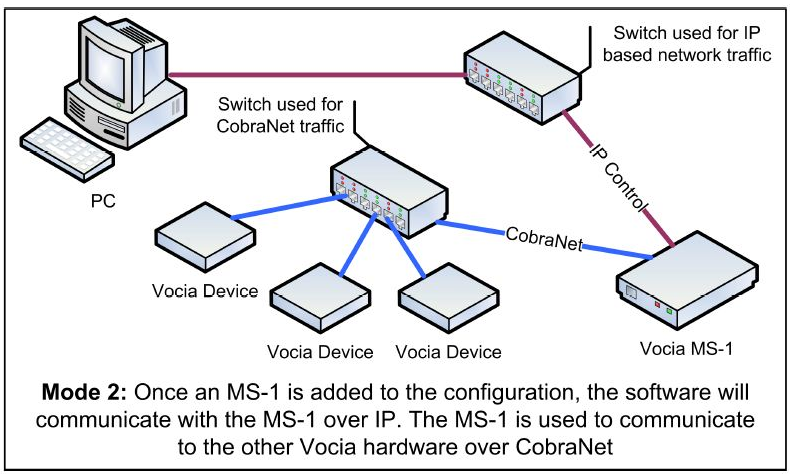 Vocia supports two modes of network communication depending on whether the system contains an MS-1e Message Processor or not. If it does, the computer running the Vocia software is required to be connected to the IP network for control, configuration updates and real-time feedback from devices. For systems that do not contain an MS-1e, the computer should be connected to the CobraNet network.
This particular configuration uses an MS-1e so the LAN-1 port, as well as the control computer, should be connected to the IP network. LAN2 should be connected to the CobraNet network where all of the other Vocia devices reside. The MS-1e will then act as the bridging device from the IP network to the CobraNet network. The factory default IP address for the MS-1e is 192.168.1.101 which is already set up in the example configuration. For the MS-1e's servicing buildings 1 and 2, seeing as they need to reside on the same subnet but each IP address within a subnet is required to be unique, the addresses of these two units have been set to 192.168.1.102 and 192.168.1.103. Should any problems occur to connect to the system, connect the control computer to the CobraNet network and use the MS-1e device maintenance tool from the Vocia Software.
The CobraNet network should always be isolated, or placed in its own VLAN away from other network traffic. This is due to audio transmissions requiring high bandwidth for uninterrupted communications.
The DS-10 Desk Paging Stations are the only devices in this configuration that require 802.3af (Class 3) power from a PoE capable switch or a suitable PoE injector. Seeing as POE capable switches may provide an excessive amount of POE capable ports, it might be more economical to use inline POE injectors in this instance unless further expansion of the system will be considered in the future.
System setup
All Vocia devices are set, by default, to unity gain. This allows the system to start working, once the file is loaded, with minimal adjustments.
- Select output voltage on the VA-8150CV amplifier to 70V or 100V as needed, or for the VA-4030, the impedance or voltage as necessary (don't forget to set the rotary selector on the rear of the amplifier to match).
- Check and confirm adequate DS-10 microphone input level from the Audio & Live Control tab found under the respective units properties
- Adjust the amplifier output level as needed for each zone. Start at a reduced level and increase until a comfortable level is achieved.