

Creating a VoIP paging setup for Tesira
End users may want to make use of existing infrastructure to add paging capabilities to their site. This article will cover one such solution using Tesira's VoIP capabilities to enable telephone-based paging.
Example Requested Scope
- VoIP-based paging to 8 speaker zones
- Individual, multi-zone, and all-page
- Looping audio paging instructions (as would be found in an IVR system)
- Ability to reset zone selection during call
- Tone to indicate page has started
- Automatic paging reset on hang-up

Solution Concepts and Example Configuration
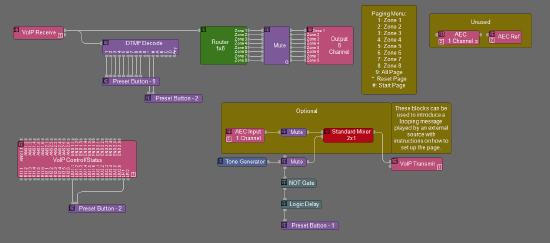
- Route the VoIP Receive block to a Router block to enable zone selection
- Route the Router block to the respective output block for each speaker zone
- Then route the VoIP Receive block to a DTMF Decode block for control
- This will be accomplished by Preset Button blocks being fed logic from the DTMF Decode
- 1-8 will select the respective zone for paging
- Multiple buttons can be selected for multi-zone pages
- 9 will select all zones for an all-page
- * will reset all selections
- # will unmute the VoIP Receive block's route to selected zones' respective outputs, mute the audio instructions, and play a tone to indicate paging has started
- Route an analog input (standard input for Server/Server-IO with SIC-4 and Forte X or AEC input for Forte VT, Server/Server-IO with SEC-4, and legacy Forte VI) through a mute block and mixer to the VoIP Transmit block
- This will be the source for the looping audio instructions
- Additionally, route a Tone Generator through a mute block and the above mixer to the VoIP Transmit block
- The mute block here will feed its logic signal into a NOT Gate and Logic Delay block to trigger a Preset Button that mutes this path after half a second
- This is the tone that will indicate paging is live
- Connect the LIU1.1 and LR1 nodes from the VoIP Control/Status block to a Preset Button block
- This Preset Button block will reset the paging interface upon the line going active and upon hanging up
See the template design for more details.
Considerations
For smooth operation and end-user confidence, enable Auto Answer and Local DTMF within the VoIP Control/Status block.
Input and Output blocks can be replaced as needed for different audio sources and destinations.
VoIP blocks can be replaced with Telephony blocks if the end user has a POTS system.
Ducker blocks can be used in conjunction with this setup to enable background music ducking in zones where that is present.
Please see this article for the list of supported VoIP platforms.
There is no way within Tesira to provide feedback to the end user over the phone on which selections they have made in the DTMF Decode block.