Utilizing the Feedback Suppressor Block to Set EQ
Understanding Acoustic Feedback
Acoustic feedback is caused when a microphone amplifies the signal coming through the speakers, and plays that signal back out through the speakers. This often results in the speakers producing a frequency that grows louder and louder. EQ can address feedback by reducing the microphone's sensitivity to a particular frequency, but should not be the first option. The core issue behind acoustic feedback is that the source intended to be picked up by the microphone is not significantly louder than the amplified source, from the perspective of the microphone. This could be caused by a noisy or reverberant space, a quiet source, or poor microphone technique/placement. System design and room tuning are outside the scope of this article, but more information on those topics can be found here and here. Once those aspects have been addressed, either through acoustic treatment and/or better microphone placement, the last step is to tune the system.
Ring Out the Room
After acoustic treatment has been installed in the space, tables and furniture have been added, and the configuration file has been programmed, it is time to adjust EQ to tune the system to the room. Before tuning the system, be sure that all gain stages are set appropriately, and all routing has been completed, including AEC reference routing. This process will likely result in output levels as loud as the sound system can produce, so hearing protection is recommended. Please also ensure that the space is clear of anyone without hearing protection.

- Add a Feedback Suppressor, Parametric EQ, and limiter to the mic signal flow, in that order.
- Be sure to set the Feedback Suppressor and parametric EQ to have the same number of bands.
- The limiter should have Look Ahead Delay enabled and the peak threshold set to 0dBu to protect the speakers.
- Ring out the room one microphone at a time.
- Introduce an impulse to excite the room, such as a clap, or have someone speak loudly into a microphone from a few places the mic will be used.
- Slowly raise the microphone's gain until feedback begins.
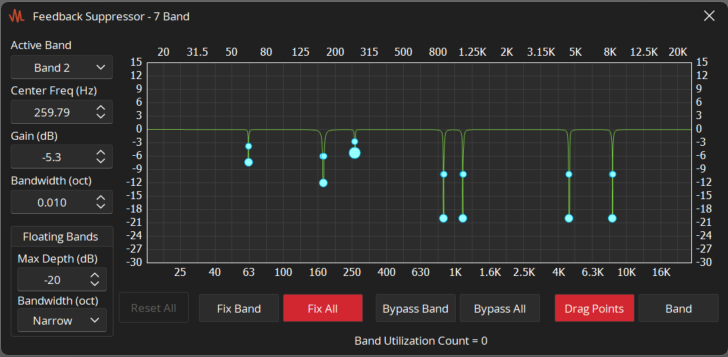
- Once the feedback suppressor has created an EQ curve, set all bands to fixed.
- Copy DSP Data from the Feedback Suppressor block to the Parametric EQ block.
- To do this, right click the Feedback Suppressor block, select Copy DSP Data, and then right click the EQ block and select Paste DSP Data.
- The shortcut to copy DSP Data is CTRL + U and the shortcut to paste DSP Data is CTRL + T.
- Remove the Feedback Suppressor block to conserve DSP resources. You may also consider removing the Peak Limiter or disabling Look Ahead Delay.