

Integrating Vocia with Qt X Sound Masking Systems
Qt X Sound Masking provides a consistent and even distribution of sound masking noise. It stands to reason to think this system can also be used for paging. Integrating a Vocia Paging System with a Qt X Sound Masking System is a fairly easy process but it requires understanding some key concepts, careful planning and design. This article covers some basic concepts and the steps to estimate minimum system requirements for a specific project.
Sound Masking Zones vs Paging Zones
Whether you are familiar with Vocia or Qt X, it's important to understand the distinction between the concept of zones in the scheme of these two platforms. This becomes more critical when these two systems will be integrated. While zones may mean the same thing in some particular cases, it's not always the norm. For this reason, it's important to use the correct terminology when designing a system to avoid confusion. Here are some key differences between Sound Masking Zones and Paging Zones
Sound Masking Zones:
- A Sound Masking Zone is an area where speech privacy is required
- It's defined primarily by the acoustic characteristics and dimensions of the space.
- One area may require one or more Sound Masking Zones if the acoustic environment changes (i.e lower ceilings, different acoustic treatment)
- Qt X controllers allow the assignment of zones based on the needs of the space, in some cases spanning across multiple controllers in a larger system.
- Note that Qt X passive emitter types do not support paging or background music sources in Qt X systems. It is recommended to use active emitters, DS1320, or 4/8 speakers for paging applications. Additional info on this topic may be found here.
Paging Zones:
- A Paging Zone is a unique audio destination where a page or background music can be directed
- It's defined primarily by the needs of the BGM/Paging system
- Paging zones are generally acoustically separated
- A Paging Zone may be set to broadcast the VO-4 signal as a BGM source or a Page source using Logic GPIO on both devices to trigger the page.
When combining paging and sound masking it's very important to understand that a single Paging Zone can point to one or more Sound Masking Zones.
Qt Pro versus Qt X
In Qt Pro hardware, zone assignment was tied directly to the physical outputs of devices. Zone controls were handled on a 1-to-1 basis, and any level adjustment that was done via web UI or front panel would follow its receiving zone. If two zones were in a common space, the level would need to be matched on each output to allow for uniform coverage.
The need for either direct vs. indirect speaker coverage or more zone management of a larger system created complications with this topology. Physical zone assignment required different controllers to be used as well as the need for multiple points of control.

Qt X virtualization
In Qt X hardware, a zone is a grouping of outputs under a common control hierarchy. This allows for zoning to cross physical barriers allowing for systems to grow larger in scale while remaining manageable. When programming, the virtualized zones can be as simple as one zone covering all outputs of a controller, or as complex as zoning across multiple networked controllers that are located across different architectural zones. All outputs that are assigned in a zone can have a single masking, background music, and paging level that allows for one point of contact for adjustments.
In the Qt X example above, the physical outputs are reversed from the actual zone names. This would not be possible in a Qt Pro hardware setup. While not a practical application, it highlights that Qt X hardware eliminates the need to correlate physical connections to cable runs.
More info on this topic may be found in this article: Qt X Virtualized zones
Page Codes
A Page Code defines the destination of a page and the characteristics or properties of that page. Like so, a Page Code could direct a page to particular Paging Zone, define the Preamble, Priority and other properties. of the page. A different Page Code could also page to the same Paging Zone, but with different properties. That same zone could also be part of a "Page All" Page Code. These are the properties you can define in a Page Code:
- Paging Mode: whether the page will be a live page or a pre-recorded message
- Priority Level: higher priority pages can override lower priority pages
- Preamble: whether the Page Code will play a preamble or not
- Auto Repeat: allows a page to be repeated a number of times with a determined interval between them. These can be pre-determined or user adjustable
- Delayed Release: whether the page will play in real time or be delayed by a short period of time
- Store&Forward: whether the page will be saved and played when the destination Paging Zone becomes available
Using Vocia with Qt X as a paging or background input
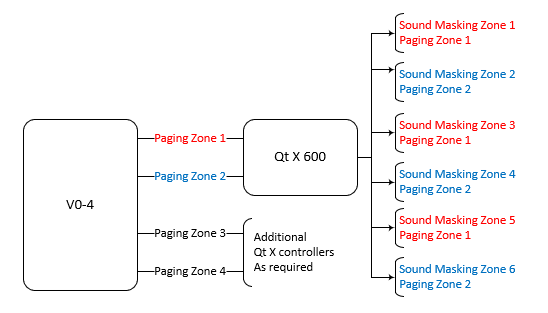 Qt X Controllers support virtualized Sound Masking Zones that can be configured independently of physical output assignments. All Qt X units provide two analog audio inputs that can be used for paging and/or background music. Within the Controller, these signals can be routed to any combination of the virtualized Sound Masking Zones, allowing zones to span across multiple physical outputs or even multiple networked controllers.
When using Vocia for BGM and Paging, all the control is handled by Vocia. A single VO-4 provides four analog outputs for four independent zones. Since each Qt X Controller has only two analog inputs, at least two Qt X Controllers are needed to utilize all four outputs from the VO-4. Each input of the Qt X Controller represents a Vocia Paging Zone. Since the inputs in the Qt X can be routed to each Sound Masking Zone, we can decide whether a Sound Masking Zone will be part of Paging Zone 1, Paging Zone 2, etc. This permits creating a tailored mix of BGM and Paging for each Sound Masking Zone.
When using the VO-4 for all BGM and paging control, best practice is to configure the Qt X inputs as "Background" (continuous operation) rather than "Paging" inputs (contact closure activation) via the Intents selection, since Vocia handles all the switching and timing functions internally.
Additional info on setting up sources can be found at the following:
- Qt X Configuration using the Qt X software
- Qt X Analog source programming via web UI
- QT X Help - Audio Sources
Note: Selecting "Intent" as paging requires a logic source to be connected to the Qt X controller. Proper logic programming and assignment will be required to trigger analog paging audio to Qt X zones.
Estimating equipment needs
When designing a system, it can be a bit difficult to see clearly what equipment is needed to cover both, the paging and sound masking needs. A common mistake is to think about it in terms of Pages Codes. As explained above, a Page Code just defines the destination of a page, a Paging Zone, so we need to think in terms of Paging Zones and deal with Page Codes at the programming stage. With that in mind, the following steps should serve a guide to estimate the equipment needs.
- How many floors does the office building have? This will be the minimum number of Qt X Controllers needed.
- On a per-floor basis, how many Sound Masking Zones are required? This will help define whether Qt X 300 or Qt X 600 Controllers are needed per floor. Qt X 300 supports three pair of outputs while Qt X 600 supports 6 for direct field string of emitter masking applications. Qt X 800 and 805D controllers can be used for applications where direct (DS1320) or indirect speakers (4/8 ohm) are required. Qt X controllers support Virtual Zone topology where any combination of outputs on one more controllers may be grouped together to share a common masking level and BGM/Paging source.
- On a per-floor basis, is direct field or indirect field masking required? This will help determine the type and quantity of sound masking controller from the QT X family.
- On a per-floor basis, how many Paging Zones are required? Think about individual audio destinations whether this will receive pages and/or background music.
- The number of Paging Zones divided by two will give you the number of controllers needed per-floor
- The number of Paging Zones divided by four will give you the number of VO-4 Outputs required per-floor
- Qt X controllers have the ability to share networked media via AVB or Dante. Any controller with the "D" variant in the model name will have capabilities to support AVB or Dante, while the standard controller only supports AVB. This is the means controllers that are participating in a larger system will share paging inputs that are brought in via the analog connections. It is important to plan for proper network switch topology and use AVB licensed switches when using the AVB only models to support the proper media transport.
Connecting Vocia to Qt X

Once the quantities have been defined, connecting the VO-4 outputs to the Qt X controllers is an easy process. Both the VO-4 and Qt X Controllers use Balanced, Line-Level analog connections. Both devices use screw terminal block connectors.. These connections should be made balanced audio cabling (two conductors plus shield) and the wiring should be point to point (i.e positive to positive, negative to negative and shield to shield).
Audio Setup
Once the system is wired and the Vocia file has been created and loaded into the system, some Audio adjustments are needed to ensure proper signal routing and levels. Both, the VO-4 and Qt X Controllers use line level analog signals so audio calibration is straight forward. The following steps highlights the process:
- Make certain that Paging Zones have been assigned to the VO-4: Normally each
 Paging Zone will be match with a single output on a VO-4.
 - Create and send a Qt X configuration that includes two inputs assigned as "Background" sources.
- Verify volume levels on meters in the "Audio Inputs" icon form Qt X software or Web UI.
- Adjust audio input level that corresponds to the associated Paging Zone for each Sound Masking Zone in the Qt X configuration .
- Typically, unity gain will be all that is needed for the line level signal coming from V0-4.
- Select required Paging source input for each zone from the "System Zone Settings" selection.
- Make individual adjustments to level to each Paging Zone or Sound Masking Zone as needed: The default settings are a starting point at unity gain. Some Zones might require more or less volume. If this is the case, individual adjustments can be made either in the VO-4 outputs or Qt X corresponding zone level. When doing so, take into account that:
- Modifying output level in the VO-4 will affect all Sound Masking Zones that are part of that Paging Zone.
- Modifying the "Audio Inputs" for each source will affect all other zones feeds in the Qt X controller.
- Modifying the "System Zone Settings" level in the Qt X Controller will affect only the Sound Masking Zone. All other Sound Masking Zones in the same Paging Zone will not be affected.
Troubleshooting
Here a list of things to check if something doesn't work right:
- None of the pages or background music go out: This could be associated with settings on either the VO-4 or the Qt X or the wiring between them. Check the following:
- In Vocia, check that the correct zones are assigned to the proper outputs in the VO-4.
- Open the VO-4 Configuration dialog and select the Audio & Live Control Tab. Verify that output levels are set to 0.
- While making a page, look at the output meters in that same dialog. There should be some movement.
- Verify that the corresponding Analog Input Level is seen on the Qt X controller in the "Audio Input" meter. Adjust input gain if needed to provide proper gain structure through out Qt X topology.
- Verify wiring between the VO-4 and the Qt Controller.
- Check that "Background" is checked on Intents for analog input. If "Page" is select, a contact closure will be required to trigger audio to zones.
- If "Page" is the selected intent, then ensure that the contact closure is in place and is set in Qt X software for push to talk operation with proper "Active High" or "Active Low" setting to match trigger.
- Pages are not coming out on one specific Sound Masking Zone:
- For that particular Zone check that the corresponding Analog Input is set appropriately in the Qt X Controller.
- The wrong page is coming out on a specific Sound Masking Zone:
- Check the Analog Input Levels in the Qt X Controller.. Settings might be reversed.
- Sound Masking Zones are not getting proper paging and or background music from Vocia.
- Validate that proper zone routing is feeding from the VO-4 to the Qt X and that the selection in Qt X Zone assignment matches the appropriate feed in the dropdown menu.
- Use meters to match up test pages to proper zones in both Vocia and Qt X software.